Docusaurus recipes
These recipes only apply when generating documentation into a Docusaurus site with @graphql-markdown/docusaurus. For the framework-agnostic path (any other formatter), see Integration with Frameworks. For initial plugin setup, see Getting started.
Custom homepage
If you decide to use a custom homepage for the GraphQL-generated documentation, then set the sidebar position to sidebar_position: 1 to ensure it shows first:
---
id: schema
slug: /schema
title: Schema Documentation
sidebar_position: 1
---

This documentation has been automatically generated from the GraphQL schema.
If you want to hide the homepage from the sidebar, then set the front matter sidebar_class_name (or className depending on your Docusaurus version) to navbar__toggle.
---
id: schema
slug: /schema
title: Schema Documentation
sidebar_position: 1
sidebar_class_name: navbar__toggle
---
Customize deprecated sections
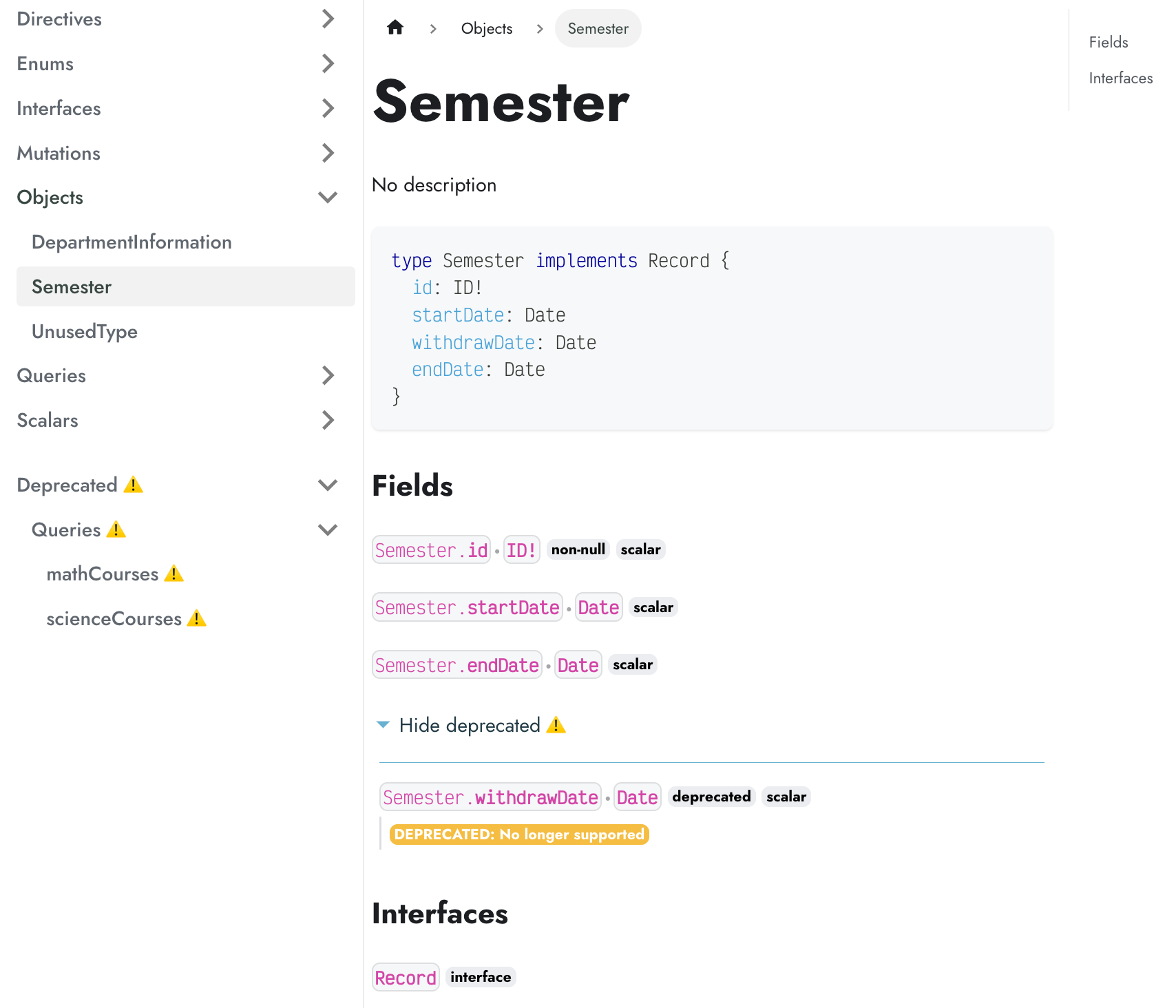
When using the option printTypeOptions.deprecated set to group, the rendering can be customized using the CSS class .deprecated.
Adding a warning emoji ⚠️ is done with a quick tweak of Docusaurus CSS.
.deprecated a::after,
span.deprecated::after {
  content: "⚠️";
  padding-left: 4px !important;
  transform: none !important;
}

.deprecated {
  padding-top: 1rem;
}
The above CSS will render the deprecated sections as the following
Regenerate the documentation
In a Docusaurus site, build your website:
npm run docusaurus build
Or run the documentation generator directly:
npm run docusaurus graphql-to-doc
The npm run docusaurus graphql-to-doc command generates MDX files locally from your GraphQL schema. The possible command flags are documented in settings.
Using hooks with Docusaurus
When using Docusaurus, you can extend the default MDX module to add custom hooks while keeping all the built-in formatters:
const DocusaurusMDX = require("@graphql-markdown/docusaurus/mdx");

const afterPrintCodeHook = async (event) => {
  // Your custom logic here
  event.output = `${event.output}\n\n<!-- Custom content -->`;
};

module.exports = {
  ...DocusaurusMDX, // Keep all default formatters
  afterPrintCodeHook, // Add your custom hook
};
Then configure your Docusaurus plugin to use the custom module:
plugins: [
  [
    "@graphql-markdown/docusaurus",
    {
      schema: "./schema.graphql",
      formatter: require.resolve("./custom-mdx.cjs"),
      // ... other options
    },
  ],
],
See Hooks Recipes for the full framework-agnostic hook reference.
Multiple schemas (Docusaurus plugin instances)
If you need to support multiple schemas in a Docusaurus site, then you can set multiple instances of the plugin.
Assign a unique id attribute to each plugin instance (if not set, then id value is default).
plugins: [
  [
    "@graphql-markdown/docusaurus",
    /** @type {import('@graphql-markdown/types').ConfigOptions} */
    {
      // id: 'default', // omitted => default instance
      schema: "./schema/swapi.graphql",
      rootPath: "./docs", // docs will be generated under './docs/swapi' (rootPath/baseURL)
      baseURL: "swapi",
      homepage: "./docs/swapi.md",
      loaders: {
        GraphQLFileLoader: "@graphql-tools/graphql-file-loader" // local file schema
      }
    },
  ],
  [
    "@graphql-markdown/docusaurus",
    /** @type {import('@graphql-markdown/types').ConfigOptions} */
    {
      id: "admin",
      schema: "./schema/admin.graphql",
      rootPath: "./docs", // docs will be generated under './docs/admin' (rootPath/baseURL)
      baseURL: "admin",
      homepage: "./docs/admin.md",
      loaders: {
        GraphQLFileLoader: "@graphql-tools/graphql-file-loader" // local file schema
      }
    },
  ],
],
Instance with an id will have their command line:
npm run docusaurus graphql-to-doc:admin
If you also use GraphQL Config, you need to define projects with the same id (including default):
plugins: [
  "@graphql-markdown/docusaurus", // default instance
  [
    "@graphql-markdown/docusaurus",
    /** @type {import('@graphql-markdown/types').ConfigOptions} */
    {
      id: "admin",
    },
  ],
],
For the full generic (non-Docusaurus-plugin) multi-schema setup via GraphQL Config, see Additional schemas.